Post to Tweetie from Google Reader

Posted under 1337 Hax, Computer Science, The Internets on Aug 16, 2009.

Google Reader Logo

As I cave in to using yet another Google service, Google gets one step closer to becoming a hive mind.

I recently decided to ditch NetNewsWire and use Google Reader as my main RSS reader. Google Reader helps me keep up on the latest tech news and important internet trends.  I’ve been really happy with it so far, except for one thing.

Google allows you to post articles that you’re reading to various social networking sites, like Twitter, Facebook, and Digg. But, Google’s built in “Post to Twitter” feature opens up a new window (or tab in Firefox’s case) at Twitter.com just to post a new tweet. Lame!
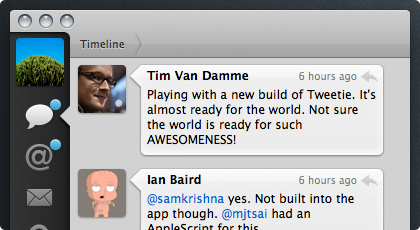
Screenshot of TweetieI already use an amazing Twitter client for Mac, called Tweetie. I’ve gotten used to it’s slick interface that opens a tiny little tweet window when you want to write a new tweet. It’s so much better than opening a whole new tab!

I wanted this functionality to be available to me in Google Reader. What was I to do?

Well, the company behind Tweetie, AteBits, offers up a handy bookmarklet to help users easily tweet stuff while surfing the web. You just create a new bookmark and set the URL to be:

javascript:window.location='tweetie:'+window.location

But, we can improve this by adding the title of the website to the Javscript code, which looks like this:

javascript:window.location='tweetie:'+document.title+'%20'+window.location

Then when you click on this bookmark, a new tweet pops up that looks likes this:
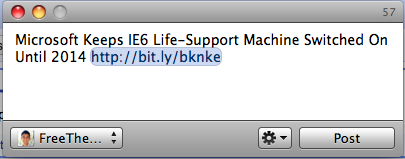
Tweetie tweet interface

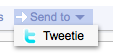
Awesome, right? Now, I just need to add this custom Javscript URL to Google Reader’s “Send To…” section, right?

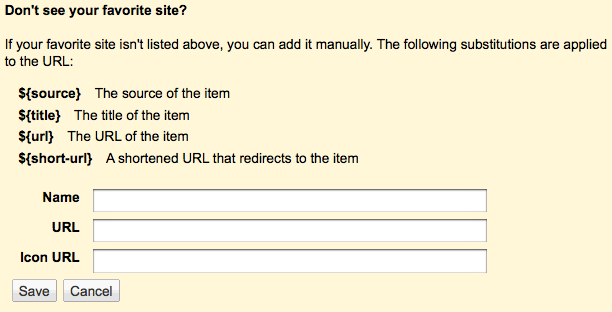
This is the Google Reader interface for adding custom "Send To..." buttons

This is the Google Reader interface for adding custom "Send To..." buttons

But, it’s not that easy! Google blocks Javascript URLs (probably for security reasons or else it’s just an oversight on their part) and you get presented with this sad error mesage:

No Javascript URLs!

No Javascript URLs!

But, I want Tweetie in Google Reader, darn it! So, I whipped up a little PHP/Javascript workaround. I’ll post it here, because I imagine that others have had this same problem.

<html>
    <head>
    </head>
    <body>
        <script type="text/javascript">
        <!--
        window.location='tweetie:'+'<?php echo $_GET["title"]; ?>'+'%20'+'<?php echo $_GET["url"]; ?>';
        window.close();
        //-->
        </script>
    </body>
</html>
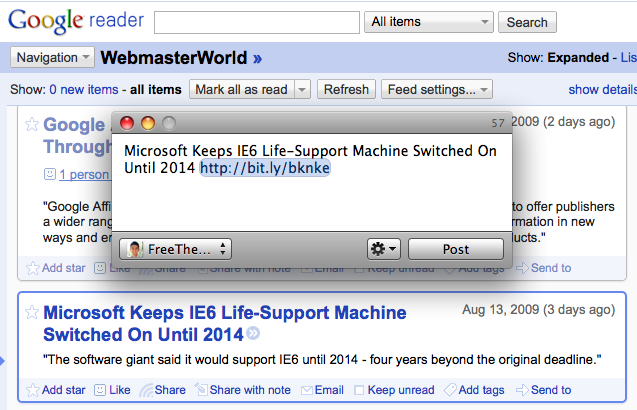
This is the final result!

This is the final result!

This trivial script just looks for a title and URL passed in via GET parameters, redirects the browser there, and then closes itself to get out of the way. All that remains is your new tweet window in Tweetie and Google Reader in the background.

This is what it looks like in action!

This is what it looks like in action!

Then, I just uploaded this file to my server (It’s located here: http://feross.org/tweetie.php in case you want to use it).

Then, I just filled out the Google Reader settings window like this:

Set up your settings like this!

Set up your settings like this! Remember, in Google Reader, ${title} and ${short-url} stand for the article title and URL.
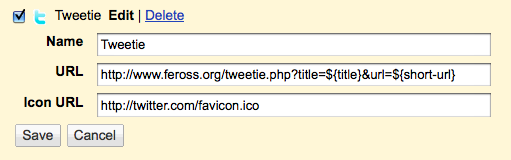
Feel free to copy these settings if you’d like to set up the same functionality for yourself!

Now, I can tweet any/all the interesting stories I read from Google Reader super easily. If you follow me on Twitter, then get ready for a firestorm of tweets!

Hopefully someone finds this useful! :-)

Related Posts

  1. Why Is This Website Called Google?
  2. Google Killer?: Twitter’s New Layout Highlights Twitter’s New Focus on Search
  3. I Just Discovered a Cool Website Called “Google”
  4. Shame on You, Comcast!
2,186 views :, , , , , , , ,

7 Comments for this entry

  • Mark R.

    Great post. I knew someone had solved this issue already. Unfortunately it doesn’t seem to work for me but I’ve no doubt the problem is my end. It simply opens a window and closes it. But Tweetie is never called.

    Any idea?

    • Feross Aboukhadijeh

      Hi Mark,

      Thanks for the comment and tweet. It’s odd that you’re experiencing problems. Try checking to see if the Tweetie bookmarklet works by itself. Make a bookmark that points to “javascript:window.location=’tweetie:’+window.location” and see if clicking on that will launch Tweetie.

      Also, what browser are you using?

  • Mark

    Hi Feross,

    I’m using both Safari and Chrome (mac). I added the tweetie bookmarklet to both browsers and still no luck. I’ve pop up blocker turned off.

    Mark

    • Feross Aboukhadijeh

      That’s strange. This bookmarklet came straight off of the Tweetie website.

      javascript:window.location=’tweetie:’+window.location

      Are you sure you’re copying it correctly? You don’t want to copy the quotes I surrounded the code with in my last comment — you want just the javascript. I know it’s silly, but this is the most likely reason I can think of.

    • Feross Aboukhadijeh

      Scratch that — I just discovered the reason it’s not working for you.

      When you copy the Javascript code and paste it into Safari or Chrome, be sure to delete the single quote characters and re-type them again yourself.

      Now it should work for you.

      Wordpress (the software I use to publish this blog) automatically takes the straight quotes I type and converts them into curly quotes. Unfortunately, curly quotes are actually entirely different characters from straight quotes and your browser is converting the curly quotes into their URL encoded form before saving the bookmark, so the URL looks like this instead:

      javascript:window.location=%E2%80%99tweetie:%E2%80%99+window.location

      Let me know if it worked for you.

  • Mark

    That did the trick! Cheers Feross. Much appreciated.

Looking for something?

Use the form below to search the site:

Still not finding what you're looking for? Drop a comment on a post or contact me so I can take care of it!

Recent Comments

  • Russell
    Russell said...
    I just listened to MC Frontalot on youtube. AMAZING. Easily the best music I have heard in some time....
  • Juan
    Juan said...
    FIRST…?! did i win?
  • Mark
    Mark said...
    That did the trick! Cheers Feross. Much appreciated.
  • Mark
    Mark said...
    Hi Feross, I’m using both Safari and Chrome (mac). I added the tweetie bookmarklet to both...
  • Rohit
    Rohit said...
    I have to agree with the link in the update post. If success could have been determined so easily...

Archives

All entries, chronologically...

KONAMI CODE!!!

Contra

+30 LIVES!