Shame on You, Comcast!
Posted under Computer Science, Politics, The Internets, Web Dev on Aug 23, 2009.
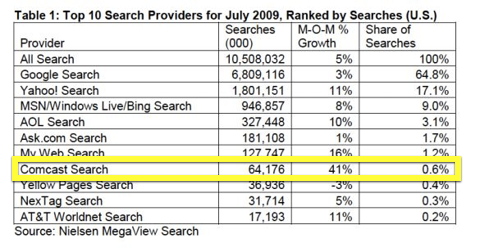
Last week, I posted about how Google lost search market share, but overall US searches increased by 5%.
Now I have some more interesting news to report about those same statistics. When I first looked at the data, one of the figures struck me as a bit odd when I first saw it, but I didn’t post about it …until now.
The search engine with the largest growth in US search market share last month was Comcast. Say what?
Yup, you read that correctly. In fact, Comcast’s month-over-month search market share increased by 41%. Granted, they never had much of the search market to begin with, but still — 41% seemed like way too much for Comcast to ethically gain in a single month.
After some investigation, I discovered that Comcast has been up to something fishy.
When I first saw this statistic, I just attributed it to a Comcast.net homepage redesign (they like to redesign their homepage every few months to annoy all their broadband customers).
But, the gain still seemed to be too high to be caused by a homepage redesign alone, and I realized that Comcast was probably misleading/tricking its customers in some way, but I couldn’t prove anything nor did I find any news that explained the sudden 41% gain.
Well, lo and behold, I was right: Comcast has indeed been up to no good, and I discovered it firsthand when I went home to see my parents this weekend. (They are Comcast High-speed Internet customers.)
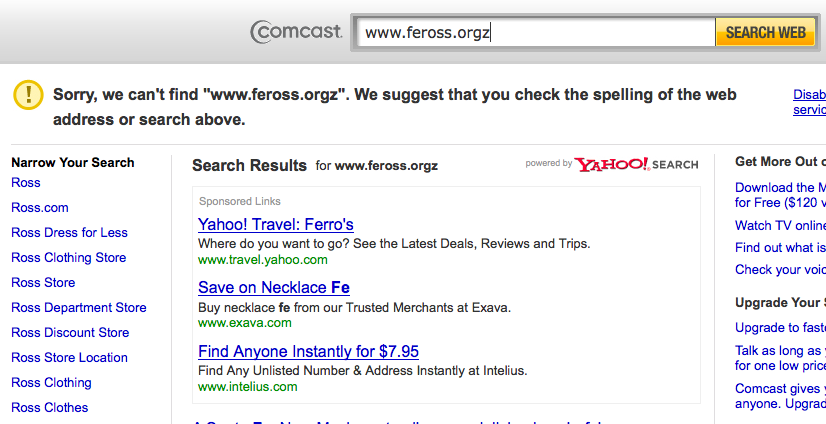
I was checking my email, reading news, and twittering — in other words, happily surfing the Internets — until I decided to do a new blog post. I go to type in http://www.feross.org into the URL Location bar, when… BAM, I see this screen:
What? How’d I end up here? Well, I mistyped the URL. But I don’t have Comcast set as my default search engine and Firefox shouldn’t be redirecting incorrect URLs anywhere! What gives?
Well, it turns out that Comcast is the latest ISP to start hijacking incorrectly typed URLs and redirecting them to their own search sites. They don’t call it DNS hijacking, which is the proper name for this practice, though. They call it Domain Helper, in an effort to hide what it is they are really doing to gullible customers unfamiliar with the practice.
Apparently, they announced their plans to roll out this “service” to customers on their Comcast Voices blog (a website that I’m sure most Comcast customers read daily!).
Today, we’re beginning to roll out something new to help high-speed Internet customers get where they want to go online even faster and easier than before. It’s called the Domain Helper service and we’re introducing it as a market trial in Arizona, Colorado, New Mexico, Oregon, Texas, Utah, and Washington.
No! This service doesn’t help me get online faster or easier! It’s your sad attempt to squeeze a bit more money out of your deprived customers, while breaking many Internet services in the process and exposing your customers to security risks.
And now, they’ve officially rolled the service out nationwide to all Comcast customers so we can all take part in the wonderful experience of DNS hijacking. The Register had this to say about it:
The DNS hijacker is here to stay.
When Denver-based developer Brent Gartner returned home from vacation this week, he discovered that Comcast, his home ISP, was redirecting his mistyped urls to its very own ad-laden search pages. Earlier this month, the cable giant resurrected this age-old land-grab scheme in several US markets, including Colorado, with an eye on hijacking typos across the country.
Comcast does provide an opt-out. And Brent Gartner promptly did so. But the new scheme still boils his blood. “This pisses me off as it will surely break many web-serivces, spiders, and any client other than web browsers that use HTTP,” he tells The Reg. “It looks like a blatant attempt to steal revenue from competing services.”
(from The Register – Comcast trials
Domain Helper serviceDNS hijacker)
Incidentally, DNS hijacking has been a trademark of spyware and adware for years! Now, Comcast customers get this “feature” included at no extra cost in their Internet service plans.
Unfortunately, things don’t look good at other ISPs. Charter, Cox, Earthlink, and Verizon have also implemented similar policies.
I guess I should look at the bright side. At least they haven’t started hijacking invalid subdomains (can you imagine if they started hijacking typo.feross.org? Talk about potential security problems!). And, while I’m at Stanford (which is most of the year), I’ll have super-fast, non-hijacked, uncensored Internet. Shoutout to the awesome Stanford IT department!
Update 10/14/2009: Someone dugg this blog post! This is the first time a random person has dugg one of my posts! Cool!


August 23rd, 2009 on 3:22 pm
Wow, nice find!
Slashdot recently ran a story on Bell doing the same thing: http://tech.slashdot.org/story/09/08/04/1512248/Bell-Starts-Hijacking-NX-Domain-Queries
They give customers an ‘opt-out’ option, but it doesn’t work. Instead of giving people real DNS results, it gives them a fake non-existent domain page that tries to emulate what their browser would normally show them:
http://www.domainnotfound.ca/bellassist/dnsassist/content/ErrorPage/_iceUrlFlag=15?_IceUrl=true&q=www.non-existent-domain.com
I vote for opendns.org. Fast, free, and their servers tell the truth.
August 31st, 2009 on 12:31 am
LOL, this is hilarious. What a sad attempt at mimicking the Firefox non-existent domain page. What was their plan anyway? Keep adding new non-existent domain pages every time a new browser version gets released?
Comcast also has an opt-out option, by the way. It seems simpler — all they require is the MAC address of your router and your whole house is opted-out.
OpenDNS is alright if you need free DNS because your ISP’s DNS is slow or if you’re troubleshooting DNS problems. I also like that you can manually reset the OpenDNS cache (you showed me that trick) which comes in handy if you don’t want to wait a few hours for DNS to propagate. Still, I don’t like that OpenDNS also does DNS hijacking. Have you tried entering a bad domain using OpenDNS? You get the same sort of sleazy search results page as Comcast and the other ISPs give you (see http://www.opendns.com/solutions/homenetwork/guide/). At least they try to correct the typo and only take you to the search spam page if they can’t correct it.
Bah, it seems like this DNS hijacking business is here to stay. Very sad.
September 10th, 2009 on 4:11 pm
I just experienced this for the first time. I’ve been a Comcast customer and today started seeing this hijacking for my browsers as well. I can’t express how much distaste I have for this practice. These kind of shady business practices are what makes people dislike and distrust these companies.
After seeing the change in search (about an hour ago), I called Comcast and they assured me the don’t do this type of thing. He further explained that they aren’t even allowed to do something like this according to their terms and conditions.
Ridiculous and shameful.
September 24th, 2009 on 3:56 am
I can’t believe that they tried to deny doing something which they’ve publicly acknowledged they do. It also doesn’t take a rocket scientist to figure out from the landing page that it’s a Comcast “service”. 0_O
September 25th, 2009 on 1:25 pm
Haha, hi Jake and Feross!
I too am Jake and discovered this the other day. Switched my parents’ router to use OpenDNS right away.
-Jake
September 28th, 2009 on 10:38 am
Well, it just hit Vermont today. Thanks for the info.
September 28th, 2009 on 10:53 am
I feel I have to add that I run Google Chrome. In Chrome, the address bar IS the search bar! So every search is hijacked.
Find a happy place
Find a happy place
Find a happy place grrrrrrrrr
And on top of this, it’s taking me (running right now) over ten minutes to log into my Comcast account page.
September 28th, 2009 on 11:27 am
Comcast has to worst web interface for email. I feel your pain. But why tie yourself to a @comcast.net email address? Try Gmail?
Also, the Chrome behavior is especially irritating.
You should disable the Comcast search hijacking by opting out. I wish you the best!
September 28th, 2009 on 11:34 am
Thanks, I don’t ever go to Comcast page, I use Gmail. And, would you believe I still haven’t been able to get to the page to opt out! Over a half hour now…
All the best to you too~ Jason
September 28th, 2009 on 11:38 am
What’s the hold-up on opting out? Why is it taking so long to load? Slow Internet?
September 28th, 2009 on 1:00 pm
HA! Yes, Comcast high speed =o) Seriously though, there was just a pop up saying they were retrieving account information that went on forever. Reloaded a couple of times.
Finally done now, and it better stay that way or it’s a phone call next time B^/
September 28th, 2009 on 1:08 pm
Haha! You should give em a piece of your mind! I wouldn’t expect any sympathy from them, though. My experiences with them haven’t been very positive.
October 6th, 2009 on 6:22 am
I downloaded their toolbar to troubleshoot something that a few comcast users where having difficulty (basicly seeing my site).
Anyway I sorted the issue and unistalled their toolbar (I am not a comcast customer, I don’t even live in th US) however my IE is stil getting hijacked by comcast.
Time to goggle how to get rid of this malware/spyware/adware or what ever they want to call it off my pc.
October 9th, 2009 on 3:08 pm
What was the issue with the Comcast toolbar? Why couldn’t visitors see your website?
If you need help changing your default search provider in IE, you should look at Spybot or CCleaner — both are excellent programs that I install right away on any new Windows PC.
October 14th, 2009 on 5:21 am
With our Internet Guide from Dyn Inc., you can disable the NXDOMAIN redirection. Plus, if you feel like blocking certain sites, you can do that too: http://dyn.com/internetguide
November 27th, 2009 on 7:03 pm
You can opt-out of the Comcast hijacking service by clicking the “Disable this error service” link on the hijacked page.
Don’t forget to restart your router if you use one.
More info: https://dns-opt-out.comcast.net/help-index.php